> For the complete documentation index, see [llms.txt](https://docs.satisfilabs.com/resource-center/llms.txt). Markdown versions of documentation pages are available by appending `.md` to page URLs; this page is available as [Markdown](https://docs.satisfilabs.com/resource-center/ai-agent-engine/agent-performance-console/legacy-agent-performance-console/dashboard.md).
# Dashboard
## Overview
The Agent Performance Console gives you a clear, outcome-driven view of how your AI agents are performing across conversations, users, and business goals.
## Topline Metrics & Charts
The top section of the dashboard surfaces your most important performance indicators at a glance. These metrics reflect overall AI activity, engagement, and response quality across your organization.
#### Topline Metrics
Metric tiles:
1. Each metric tile includes:
* A tooltip with a clear definition
* A trend indicator based on the selected timeframe
2. Metric tiles are interactive:
* Selecting a tile updates the charts below to reflect trends for that specific metric
{% tabs %}
{% tab title="Inbound Messages" %}
The total number of messages sent by users to your AI agents during the selected timeframe. This reflects overall AI usage and demand.
{% endtab %}
{% tab title="Daily Active Users" %}
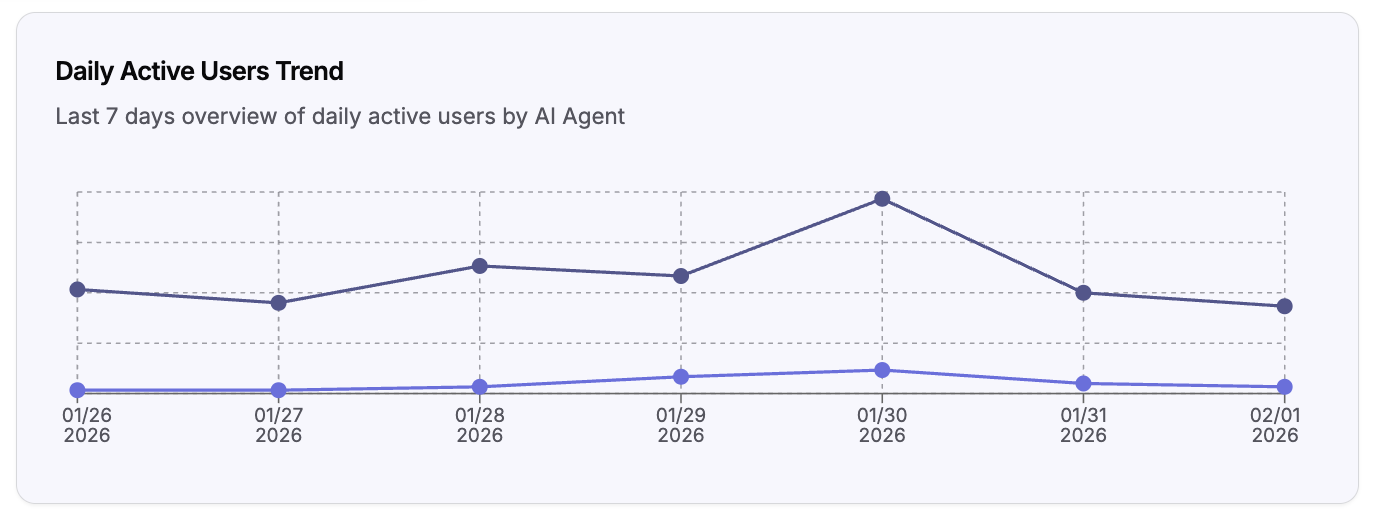
The total number of unique users who interacted with AI agents each day across the selected timeframe. A user is considered active if they send at least one message on a given day.
{% endtab %}
{% tab title="Quality Response Index" %}
Quality Response Index relies on an LLM-based system that evaluates all AI agent responses, and outputs answers 2 yes/no questions:
1. Was the response **relevant** to the user’s question?
2. Did the response **completely resolve** the user’s question?
Final score logic per response:
1. If relevant AND complete → score = 1 (100% accurate and helpful)
2. If relevant AND not complete → score = .7 (good response, but room for improvement)
3. If not relevant OR no info found → score = 0 (not a quality response)
{% endtab %}
{% endtabs %}
{% hint style="info" %}
Timeframe and page-level filters apply **only** to this section, including:
* Topline metric tiles
* Agent breakdown charts
* Metric trend charts
This allows you to analyze short-term fluctuations or long-term patterns without affecting agent-level summaries below.
{% endhint %}
#### Charts
{% tabs %}
{% tab title="Agent Breakdown" %}
Displays the selected metric broken down by individual AI agents, making it easy to compare performance across roles and responsibilities.
{% endtab %}
{% tab title="Metric Trend" %}
Shows how the selected metric changes over time. The x-axis automatically adjusts its intervals based on the selected timeframe.
{% endtab %}
{% endtabs %}
## Agents
Below the topline metrics, the dashboard shifts from system-wide performance to **agent-level accountability**.
Each AI agent is represented by a tile that summarizes how that agent is performing against its responsibilities.
#### Agent Tile Metrics
Each agent tile includes:
* Inbound Messages for that agent
* Daily Active Users interacting with that agent
* Quality Response Index for that agent
* Number of Objectives and Key Results
* Number of active Campaigns deployed
{% hint style="info" %}
#### Agent Tile Timeframe
Because OKRs are central to agent accountability, all agent tiles are displayed using each agent’s **OKR year-to-date timeframe**. OKR start dates are set to **January 1, 2026** by default.

{% endhint %}
Each agent tile includes a button that takes you directly to that agent’s profile page.\
Agent profiles can also be accessed from the left-hand navigation.