# Help Center

## Where to Find Help

Let us help you find the answers to your questions! Depending on your question and topic, you may find the quickest assistance with existing documentation, from the product team, or your Account Manager. Check out the table below to better understand where you can direct your questions.&#x20;

<table data-full-width="true"><thead><tr><th width="256">Questions/Topics/Issues</th><th width="166" data-type="checkbox">Account Manager</th><th width="149" data-type="checkbox">Submit a Ticket</th><th data-type="content-ref">Self-Service</th><th data-hidden data-type="checkbox">Self-Service</th></tr></thead><tbody><tr><td>Report an Issue/Bug</td><td>false</td><td>true</td><td></td><td>false</td></tr><tr><td>Add/Edit Chat Pages</td><td>false</td><td>true</td><td></td><td>false</td></tr><tr><td>Chat Theming Updates</td><td>false</td><td>true</td><td></td><td>false</td></tr><tr><td>New Bridge Team</td><td>false</td><td>true</td><td></td><td>false</td></tr><tr><td>Create/Edit Popups</td><td>false</td><td>false</td><td><a href="../ai-agent-engine/enhance-the-chat-experience/popups/add-edit-popups">add-edit-popups</a></td><td>false</td></tr><tr><td>Add/Edit Prewritten Responses</td><td>false</td><td>false</td><td><a href="../ai-agent-engine/manage-your-content/response-types/prewritten-plus-responses">prewritten-plus-responses</a></td><td>false</td></tr><tr><td>Add/Edit Generated Responses</td><td>false</td><td>false</td><td><a href="../ai-agent-engine/manage-your-content/response-types/generated-responses">generated-responses</a></td><td>true</td></tr><tr><td>Reset Passwords</td><td>false</td><td>false</td><td><a href="../ai-agent-engine/user-management">user-management</a></td><td>true</td></tr><tr><td>Unlock Accounts</td><td>false</td><td>false</td><td><a href="../ai-agent-engine/user-management/unlock-your-account">unlock-your-account</a></td><td>true</td></tr><tr><td>Add/Remove a User</td><td>false</td><td>false</td><td><a href="../ai-agent-engine/user-management">user-management</a></td><td>true</td></tr><tr><td>Bridge Team Assignment</td><td>false</td><td>false</td><td><a href="../live-agent-engine/admin-overview/adjust-team-assignments">adjust-team-assignments</a></td><td>true</td></tr><tr><td>Update Escalation Schedule</td><td>false</td><td>false</td><td><a href="../live-agent-engine/system-configuration/escalation-schedule">escalation-schedule</a></td><td>true</td></tr><tr><td>Best Practices</td><td>true</td><td>false</td><td><a href="../ai-agent-engine/enhance-the-chat-experience">enhance-the-chat-experience</a></td><td>false</td></tr><tr><td>New Contracts/Renewals</td><td>true</td><td>false</td><td></td><td>false</td></tr><tr><td>Billing/Payments</td><td>true</td><td>false</td><td></td><td>false</td></tr><tr><td>Features Availability</td><td>true</td><td>false</td><td></td><td>false</td></tr><tr><td>New Feature Installation</td><td>true</td><td>false</td><td></td><td>false</td></tr><tr><td>Data Reviews</td><td>true</td><td>false</td><td></td><td>false</td></tr></tbody></table>

## Product Support Resources

Looking for product help? In addition to our Resource Center, we offer four additional product support resources:

### Virtual Assistant

Get instant answers 24/7 with our Product Support virtual assistant. Powered by our Resource Center, ask your general product questions about user management, Bridge Live Chat, Generative AI upgrade, and much more.

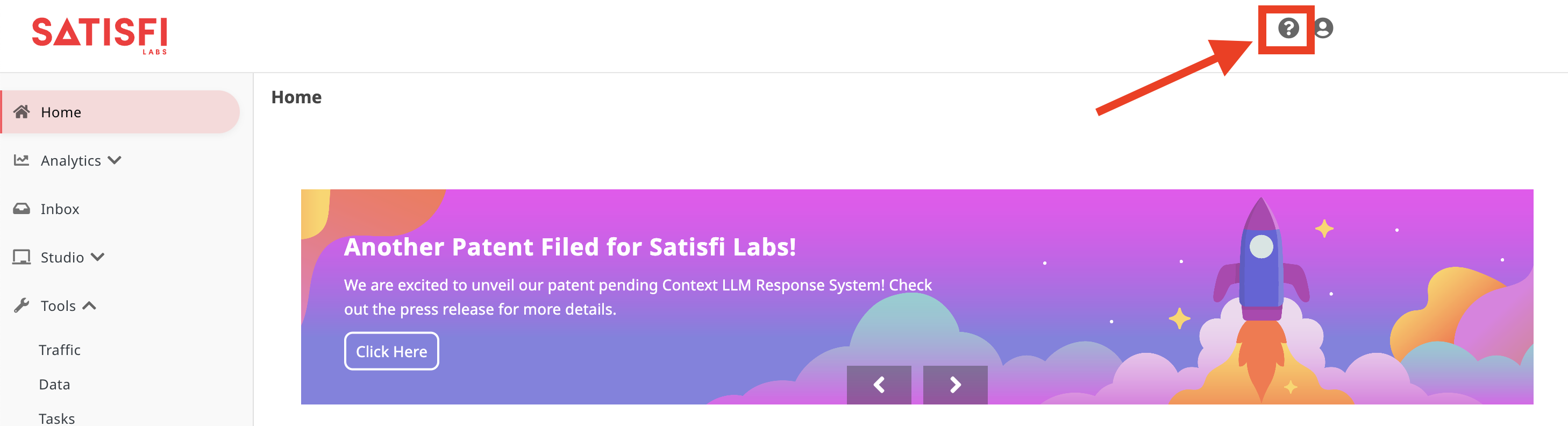
To access the chat, click the "?" icon in the top right of your Satisfi Labs dashboard or the top right corner of the Resource Center.

<figure><img src="https://167344003-files.gitbook.io/~/files/v0/b/gitbook-x-prod.appspot.com/o/spaces%2FsxN9AGLZMIc5C8dx3zU7%2Fuploads%2Fkrz0G8HuhOwoqTFnjVes%2Fimage.png?alt=media&#x26;token=0fe492a1-557d-48c8-8f54-ddefec2f9b3f" alt=""><figcaption><p>How to Access the Product Support Assistant in the Dashboard</p></figcaption></figure>

### Live Chat with an Agent

If you'd like to chat with a live person, type "Live Person" in our Product Support virtual assistant! Agents are standing by 9:00 am to 5:00 pm EST, Monday through Friday. Please note that agent availability and escalation schedules may change at any time.&#x20;

### Support Office Hours

Sign up to speak to a member of our Product team by clicking the link below!

{% embed url="<https://calendly.com/d/cvy9-zg4-vk9/office-hours>" %}

{% hint style="info" %}
If you sign up for office hours, please check your inbox for a confirmation email. This will include a calendar invite and Zoom link. If it's not in your inbox, check your spam folder or reach out to an agent via the support chat for more help. If more members of your organization are joining the call, please forward them the confirmation email.&#x20;
{% endhint %}

### Submit a Ticket

Our dedicated team monitors the Portal daily and is ready to resolve your issues quickly. Simply submit your request through the portal, and we will get back to you as soon as possible to help you with any problems you may be experiencing.

To submit a ticket, click the "?" icon in the top right of your Satisfi Labs dashboard or the top right corner of the Resource Center. Once in the Product Support chat, ask to "submit a ticket".&#x20;

{% hint style="warning" %}
Did you know that you can create a ticket by simply emailing us? Send an email to one of the appropriate email addresses to get started:

**AI Agent Engine/Live Chat Engine Tickets:** <support@satisfilabs.com>

**Marketing Engine:** <me-support@satisfilabs.com>
{% endhint %}

## Check on Ticket Status

There are two ways to check in on the status of your existing support ticket:

* Users can click the ticket link within the confirmation email to view the ticket's status.&#x20;
* All users can create an account through our ticketing system. If an account has been created, users can select the **Requests** tab in the top right corner of the Request Portal, and then select **Created by Me** to view all user-submitted tickets.

{% embed url="<https://files.gitbook.com/v0/b/gitbook-x-prod.appspot.com/o/spaces%2FsxN9AGLZMIc5C8dx3zU7%2Fuploads%2FY1IZnGQD1oJsldW6Jcv5%2FReview%20Tickets.mp4?alt=media&token=852e0688-9aaf-49ea-a2ed-319cca014407>" fullWidth="true" %}
How to View Your Request Ticket Status
{% endembed %}

<details>

<summary>How can I receive confirmation when my requests are completed?</summary>

You will receive automatic emails from [**jira@satisfi-labs.atlassian.net**](mailto:jira@satisfi-labs.atlassian.net) for the following events:

* When your request is received
* If a member of our Product team leaves a comment for your review
* When the request is complete

</details>

<details>

<summary>Can I tag other team members in my requests?</summary>

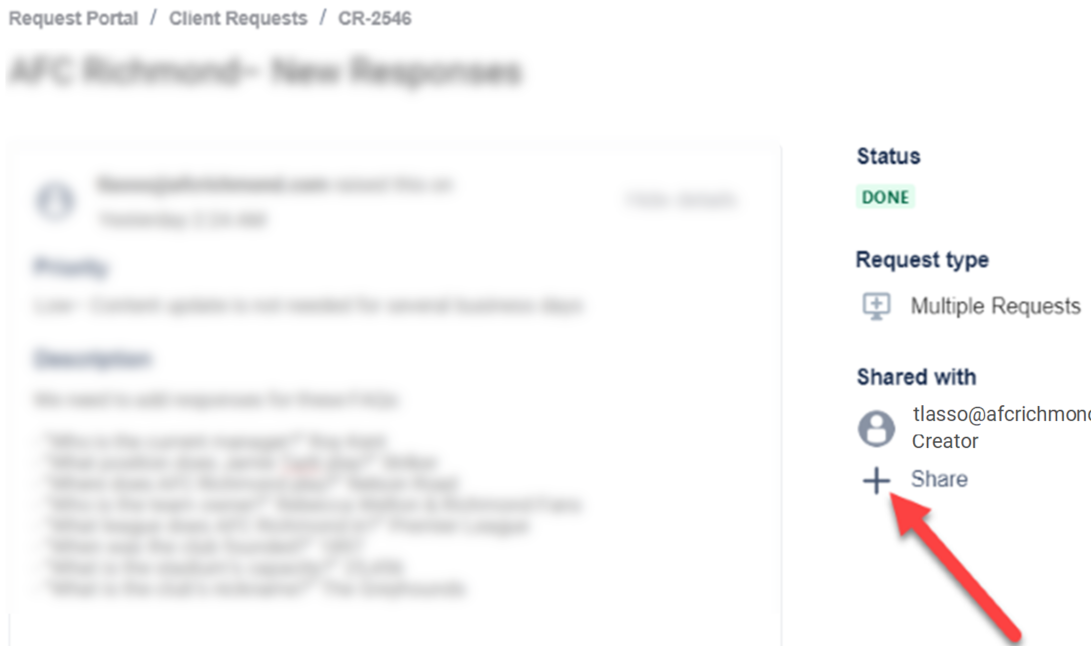
Yes! To add others to your requests:

* View your request by clicking the link in your confirmation email
* Click "Share"
* Type in the team member's email and click "Add"

<img src="https://167344003-files.gitbook.io/~/files/v0/b/gitbook-x-prod.appspot.com/o/spaces%2FsxN9AGLZMIc5C8dx3zU7%2Fuploads%2F6T4p86ML8ujJuTaaUHol%2FAdd%20Users%20on%20Tix.png?alt=media&#x26;token=cf160109-750a-4dca-86c4-c5b7b1a77b99" alt="" data-size="original"> Click the Image to Expand!

</details>

<details>

<summary>What if I'm not receiving emails from Satisfi Labs?</summary>

If you're not receiving emails from Satisfi Labs, here are four things you can do to ensure you start receiving them.

**Instructions:**

1. Check your spam folder for any Satisfi Labs emails and move them to your inbox.
2. Add our emails and domain to your contacts/allowlist:

* <product@satisfilabs.com>&#x20;
* <team@satisfilabs.com>&#x20;
* <support@satisfilabs.com>
* satisfilabs.com

Contact your IT department if you need help doing this.

3. Contact your IT department and ask them to add the following IP addresses to your contacts/allowlist:

* 54.174.60.0/23
* 143.244.80.0/20
* 18.208.124.128/25
* 54.174.53.128/30
* 158.247.16.0/20
* 54.174.59.0/24
* 54.174.63.0/24
* 3.93.157.0/24
* 54.174.52.0/24
* 139.180.17.0/24
* 54.174.57.0/24

4. You can adjust your email settings [using this link](https://hs-5508390.s.hubspotemail.net/hs/manage-preferences/unsubscribe?languagePreference=en\&d=Vnkxll5GsKrjW1b1wfl3T3prmW3ZSy2Q4hLZp0W4cpGpB4fJgmHW3T0tH64cg7sGW3_fRDc8GHsF3VmWFf290P072N6C9cQW25ySDW6vSZqQ4Pb33GVWXVK67T42XnMXk_7QbvVY1N8byqndWp-X4W4wcxRr2fzLFS387D2\&v=3\&utm_campaign=Product\&utm_source=hs_email\&utm_medium=email\&utm_content=250517311&_hsenc=p2ANqtz-9MNGkKCW6FEWNC58D0wuuVTESgIc6MNDL9waBs4uHS7awW-s-04tmqv_Pikkes1WyQnssM1R0F2zqEJjy7KHnJm4c4jsSCCilWezZXtmOq9qZelzY&_hsmi=250517311) if you unsubscribed accidentally.

</details>