> For the complete documentation index, see [llms.txt](https://docs.satisfilabs.com/resource-center/llms.txt). Markdown versions of documentation pages are available by appending `.md` to page URLs; this page is available as [Markdown](https://docs.satisfilabs.com/resource-center/ai-agent-engine/agent-performance-console/new-agent-performance-console/campaign-page.md).
# Campaign Page
### **What it is**
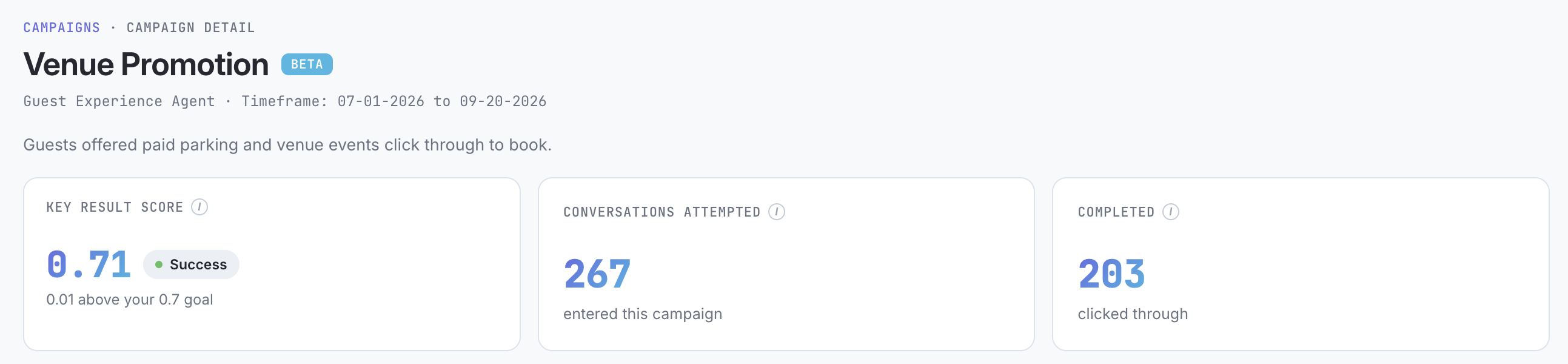
The drill-down view for a single campaign, accessed by clicking into a campaign from Campaign Overview. Shows the campaign's key result score, funnel volume, comparison against a cohort benchmark, weekly trend, and a breakdown of how conversations were resolved by topic.
A campaign page gives you the "why" behind the single score shown on the overview page, not just "0.57, Partial Progress," but the underlying funnel, how that compares to peers, how it's trending week over week, and what topics are actually driving the volume.
See the [**glossary**](https://docs.satisfilabs.com/resource-center/ai-agent-engine/agent-performance-console/new-agent-performance-console/glossary#campaign-overview) for key terms and definitions used on this page.
**Date range**: this page doesn't have its own separate date filter. It reflects whatever range is currently set on Campaign Overview, if you want to look at a different period, change the filter there before drilling in.
### What you're looking at, section by section
**Header**
Shows which agent owns this campaign, the date range currently applied, and a plain-language description of the campaign's job (for example, "Guests offered paid parking and venue events click through to book"). A BETA tag may appear next to the campaign name, this flags that the campaign type is still being refined, the data itself is reliable, but the presentation may continue to evolve.
**The three top cards**
* **Key Result Score**: the campaign's score against its 0.7 goal, along with a plain-language readout of exactly how far above or below goal you are (e.g., "0.01 above your 0.7 goal").
* **Conversations Attempted**: how many conversations entered this campaign in the selected period.
* **Completed**: how many conversations achieved this specific campaign's defined goal, a click-through, a resolved question, a ticket sold, whatever "done" means for this particular job. This is not the same as your overall resolution rate, it's specific to this campaign's task.
**Key Result Score bar**
A visual placing your score on a 0 to 1.0 scale against the 0.7 goal line, with a sentence underneath explaining exactly how that goal was set: the completion rate your peer group needs to hit to earn a 0.7 on this same campaign, and where your own completion rate currently sits relative to it.
**How you compare**
A second bar, this time on a 0% to 100% scale, showing your completion rate directly against your peer group's median completion rate for this same campaign.
**Attempts & completions / week**
A trend line showing weekly volume for both conversations attempted and conversations completed, so you can see whether performance is improving, holding steady, or declining, and spot any spikes tied to specific events or promotions.
**How questions were resolved**
Breaks down every resolved conversation into **Fully Resolved** (handled by the agent alone) versus **Partially Resolved** (made progress, but didn't fully complete the ask), then goes a level deeper with the specific topics driving that volume, ranked by how often each came up.